Pokazywanie postów oznaczonych etykietą programming. Pokaż wszystkie posty

środa, 25 lipca 2018

Toolchains - part 2


In the last part I described my MCUs of choice - STM32s. But sometime you need something special. For me this special thing is an real-time safety MCU - Texas Instruments Hercules. This is an ARM-R4-based MCU dedicated for enhanced safety (SIL3). Sounds fancy, right?

TI provides developers with a dedicated tool for configuring the MCU - HALCoGen. It generates startup files and adds all preconfigured HAL libraries to the project for a broad range of IDEs - including Keil V5, which I use.

So te begin with, we run HALCoGen and choose out MCU:


Then choose ARM Compiler (as we will use Keil) and press OK button. HALCoGen will load all the libraries, and after few seconds we can start configuring the MCU:


The amount of options is mind-boggling, and I don't want to go into details about any of them to be honest. On the screen above you see the main screen, showing the block diagram of the MCU. By clicking on any of these modules you can directly go to their respective configuration page(s) with their subpages etc etc. Read some datasheets before starting to do that. View some examples at TIs webpage.

Rememeber that you have to enable drivers for every peripheral that you want to use. It is not done automatically. Also remember about PINMUX, as this is also has to be configured manually.

After you click all the options for your desired MCU configuration, you can generate the code (File->Generate Code or just press F5). After some seconds it will leave you with a bunch of files, that make up your project.

In order to import this files into Keil first start the IDE and select a new project. First, select the MCU (the same that you have chosen in HALCoGen). Then you can import your source files just by right-clicking in the tree and selecting "Add existing files to ...". Finally, after importing all the sources you end with something like this:


After importing all the *.c files you can start developing your application. Mainly sys_main.c and notification.c will be of interest for you. The first one is the file where main code is, and the second one handles the interrupts notifications in the system (which work really well!).

And that's it! have fun developing with your Hercules.

niedziela, 10 grudnia 2017

Toolchains - part 1

As I mentioned few times I also use my blog to writes notes for myself, that perhaps can be usefull for someone else, but this is not the main purpose of these. This time I want to write a series of notes about 'toolchains' that I use to generate projects for my MUC development. Let's start with STM32 family.

sobota, 29 lipca 2017

Synchronizing inputs and outputs in DAQmx

I'm writing this simple tutorial mostly for myself, as I am tackling generally the same problem third time in my life, and third time I had to (re)invent the exact method how to do that. The problem is very basic: How to synchronize two (or more) outputs in inputs in a NI data acquisition setup, using DAQmx in LabVIEW? By synchronizing I mean e.g. a situation where we are sampling two outputs simultanosly or measuring some data in sync with a control output.

poniedziałek, 17 kwietnia 2017

Running LabVIEW from PowerShell

Recently I was in a need to run LabVIEW VI from PowerShell while using Jenkins. The Jenkins part is pretty straightforward - you only need to install the PowerShell plugin for Jenkins and then you can run PowerShell command as a build step.

Running a VI from PS is simple, as long as you don't need to pass any commands. First of all, to make life easier add the LabVIEW executable path to the PATH environmental variable, and then just use:
Start LabVIEW C:\path\toYour\file.vi
but if you need to passy any commandline arguments to the VI (which was really important for me) trying to run the following command:
Start LabVIEW C:\path\toYour\file.vi -- arg1 arg2
resulted in an error, as LabVIEW could not find files arg1 nor arg2. To pass the exact command to the LabVIEW with arguments you have to make a clever use of apostrohes an quotation marks:
Start LabVIEW "C:\path\toYour\file.vi -- arg1 arg2"
If you want to get the commands from some variables things start to be even more complicated and you will have to use both - quotation marks and apostrophes in order to make something like:
Start LabVIEW "' + C:\path\toYour\file.vi -- arg1=" + $arg1 + " arg2=" + $arg2 + " logpath=" + $logpath + '.txt"
What I was doing was using Invoke-Expression from PS to run the command above, as it was easier than constructing the same command several times:
$code = 'Start LabVIEW "' + C:\path\toYour\file.vi -- arg1=" + $arg1 + " arg2=" + $arg2 + " logpath=" + $logpath + '.txt"'
Invoke-Expression $code
Why? mainly because you can e.g. use the Invoke-Expresson remotely on several machines over network etc. But this is totally different part of the story.

LabVIEWwise, parsing of the command line arguments is really simple, especially that I used the contruction of argument_name=argument_value, so I was able to parse them and get the values pretty straighforwards using a single case structure.

poniedziałek, 21 grudnia 2015

Installing meep under Windows

I have decided to start some FDTD calculations or at least to learn how to calculate this. In order to omit all the problems with developing my own algorithms I have decided to search for a (preferably python) library doing FDTD stuff and found meep. The only problem with that is that it needs Linux and so I decided to use Cygwin instead. I was using this tutorial with some minor differences.

wtorek, 26 marca 2013

VMEBus crate - why not.

Recently I have acquired an VME CPU-Card and thought about testing it somehow. As after powering it up the card seemed to be alive I have decided to give it a shot and try to put together an VME crate.

For that I have used an old Eurorack that I have got from some phone central (or some similar telecommunications equipment). After checking that the size of the crate is standard I bought an backplane from e-bay for... 1 Euro (plus 12 for shipping, but that's not the case). Unfortunately only this backplanes are so cheap, regular VME equipment is pricey as hell.

So i have started from taking apart the old backplane:

And putting the new one:

Sorry for the mess. You can see that here the backplane is already in position, and connected to a power supply (it takes 5 V and +/- 12 V). The PSU is also taken from the same equipment that the crate is.


This (above) is the CPU card (on the left) with the display controller removed, and the display controller itself (on the right). The CPU Card is an Pentium 120 MHz with 64 MB RAM equipped with Universe Tundra VMEBus controller. Fortunately there are plenty of drivers for this PCItoVME bridge. The cards equipment covers a wide range of peripherals - starting from two serial and one parallel port, going through VGA, Ethernet and finishing with SCSI-II. The card has two PCI-compatible slots, one of which is occupied by the display controller. It also has an PC/104, ISA compatible socket. The SCSI, together with the FDD connector are on the P2 connector of the VMEBus, so I will have to make a special connector going from the P2 on the backside of the backplane  to the SCSI harddrive. As far as I have tested the CPU-card is fully functional so after I get some free time I will try to connect an SCSI HDD to this setup and install some Linux maybe. After that I plan to go back to few years ago when I was studying and try to re-learn VHDL in order to make some VME cards for this setup


wtorek, 5 marca 2013

To PSoC or not to PSoC?

I have found several PSoC3 samples in my drawer recently... it seems that I have been planning to start learning to program these devices... why not? What do you think?

I have several CY8C3866 devices, but no programmer. As far as I know it is an JTAG programmed chip, so it should be fairly easy to put it together on my own.


środa, 6 lutego 2013

Mysterious hardware, part 2.

Okay, so I had some spare time to tinker with the Analog I/O card. Unfortunatelly I do not have much info now:
  • On the DB50 connector on the bracket are signals from/to all the MUXes, this means 32 analog ports. Most probably analog inputs. The rest of the signals on the bracket connector is unknown.
  • The card is electrically okay. It did not crash the computer I have inserted it in.
  • the adressing uses only 10 bit, from which 7 MSB are to be configured by jumpers. This should help me to talk/listen to ports of the card.
Now this project is going a bit on hold. I have to obtain a motherboard with ISA connector and as powerful as possible (for the sake of convinience). I have locates several like that, so this is matter of time only. The problem is that I do not have any PC that 1) has OS on it, 2) is able to fit the card inside. And also - I would not like to test a '97 card on a '90 PC. It is hard without complicating it like that ;).

poniedziałek, 28 stycznia 2013

Car PC, vintage style, part 3

So I have started debugging the Car PCs software and getting really into programming on that thing. I have divided the work into several 'modules' so I can gather information about one specific part of the device, independent of the rest.

1. Keypad:
Fairly simple, or event very simple. You can program it to output any character you want to using some dedicated software that I do not have. Currently the arrow keys on the front-panel go a b c d and enter is just enter.

2. LCD:
Quite easy. There are two ways of using the character LCD on the front panel: with or without drivers. If one  wants to do everything manually Data bus is under 0A9h indexed through port 22h and the control  bus is under 0A8h indexed through port 22h. Also there is a *.COM driver that allows to remap the first four lines to the LCD. The driverless version of LCD control seems nicer to me, as long as the LCD used in the PC is a HD44780 compatible.

3. GPS:
Harder. Now I know only that the GPS is residing at COM1 interface. I hope this is a fairly standard COMport GPS device and will work with nearly standard communication protocol.

4. I/O:
There is a CAN interface, Analog in and Digital in/out. Still no clues how to get to that.

5. Front panel connector:
Localized and nearly ordered.

6. Sound card:
probably there is one.

That's all for now I guess.

Geode is up and running

So I have managed to run the Geode setup. Instead of an hard drive I have utilized a Disk on Module SSD. You might note that there is a second floppy disc drive connected. This is due to the first ones malfunction. I hope a good isopropanol cleaning will be enough for it to run one more.


On that I have installed MS-DOS 6.22 together with Norton Commander and a Borland Turbo C Proffesional bundle. In the bundle there is Turbo C, Turbo Debugger and Turbo Profiler. The first two will be used to work with the Car PC.

poniedziałek, 20 sierpnia 2012

RTCU datalogger cont.

Okay, so as I wrote in the last post I had to modify the code in order to get any possibility apart from datalogging. I used asynchronous function blocks in order to get the 1-Wire communication in a separate thread-like entity.

 FUNCTION_BLOCK ASYNC Temp_DS1820;  
 VAR_INPUT  
   family : int;  
   kill : bool;  
 END_VAR;  
 VAR_OUTPUT  
   temp_calk, temp_ulam : int;  
 END_VAR;  

After that you have only to define a variable of type Temp_DS1820 and voila. To write the temperature into a file I use fsFileWriteStringNL and get the output variables out of the variable connected with the function block

 fsFileWriteStringNL(fd:=file_id, str:=temp="+intToStr(v:=temperature.temp_calk)+","+intToStr(v:=temperature.temp_ulam));  

Making the function block asynchronous makes it a separate thread without using a real thread. You only have to remember to put everything in the function block into a loop (I used while not kill do <...> end_while, so I can 'kill' this 'thread' whenever I want to) to work constantly.

This way I achieved ~15 times faster execution of the main program loop (that was only writing the temp into the file every 60 s) in the main program. This means that one can do tons of other things instead of waiting for ~700 ms to convert the temperature. Such approach can, of course, be used for various other applications that require the program to wait. RTCU DX4 is capable of multithreading so let's use it.

RTCU data logger

In this example I used a DS1820 1-Wire temperature sensor. The temperature is read from the sensor and written in a ASCII file on the SD-Card in the RTCU. Here's the code

 PROGRAM a1wire;  
 // These are the local variables of the program block  
 VAR  
   ow_dev : int;  
   sign : sint;  
   family : int;  
   dane_sint1, dane_sint2 : sint;  
   dane_int1, dane_int2 : int;  
   temp_calk, temp_ulam : int;  
   file_id : file;  
 END_VAR;  
   ow_dev:=owSearchX(first:=0, last:=255, reset:=true); // Scan the 1-Wire network  
   DebugMsg(message:=intToStr(v:=ow_dev)); // Number of 1-Wire devices in our case it is 1  
   family:=owGetFamily(device:=1); // Get the family name of the device  
   DebugMsg(message:=intToStr(v:=family)); // Family name of the device  
   DebugMsg(message:=owGetID(family:=family, device:=1)); // Get the 64bit ID of the device  
   if fsMediaPresent(media:=0) and (fsMediaOpen(media:=0)=0) then fsMediaQuickFormat(media:=0); fsDirCreate(name:="test"); fsDirChange(path:="A:\test"); fsFileClose(fd:=fsFileCreate(name:="test.txt")); fsMediaClose(media:=0); DebugMsg(message:="file created"); end_if; // if media is present and opened create a directory and go inside  
   fsMediaOpen(media:=0); // Open SD-Card  
   displayClear();  
 BEGIN  
   // Code from this point until END will be executed repeatedly  
   owAccess(family:=family, device:=1); // Acces the DS1820  
   owWrite(data:=16#44); // Order the DS1820 to convert temperature  
   Sleep(delay:=700); // Wait for 700 ms (DS1820 datasheet says tha this should be at least 750ms, but 700ms work for this particular DS1820)  
   owRelease(); // Release the 1-Wire network  
   owAccess(family:=family, device:=1); // Acces it again  
   owWrite(data:=16#BE); // Order the DS1820 to send the scratchpad content  
   owRead(data:=dane_sint1); // Read LSB   
   owRead(data:=dane_sint2); // Read MSB  
   if dane_sint1<0 then // Convert the temperature  
    sign:=64;   
    else   
      sign:=0;   
    end_if;  
   temp_calk:= shr8(in:=shl8(in:=dane_sint1, n:=1), n:=2)+sign;  
   if dane_sint2 <> 0 then // Get the sign of the temperature  
    temp_calk:=temp_calk*-1;   
    end_if;  
   temp_ulam:= 5*(dane_sint1 mod 2); // Calculate the fractional part of the temperature  
   owRelease(); // Release the 1-Wire network  
   if fsMediaOpen(media:=0)=0 then // Open the SD-Card  
    file_id := fsFileOpen(name:="a:\test\test.txt"); // Open file  
    if fsFileStatus(fd:=file_id) = 0 then // If file is opened...  
      DebugMsg(message:="file write status "+ intToStr(v:=fsFileWriteStringNL(fd:=file_id, str:="temp="+intToStr(v:=temp_calk)+","+intToStr(v:=temp_ulam)))); // ...write a string in it  
      fsFileClose(fd:=file_id); // Close the file  
      end_if;  
    end_if;  
   displayString(message:="temp="+intToStr(v:=temp_calk)+","+intToStr(v:=temp_ulam)); // Display the temperature  
 END;  
 END_PROGRAM;  

And it works! producing a test.txt file with

temp=28,0
temp=28,5
temp=28,5
etc...

Okay, that's great, but hey - I used the whole controller capacity for that. Every single run of the software takes ~1s (mainly due to the fact that I'm waiting for the temperature conversion for 700ms). So the next thing to do is to put the temperature reading from the 1-Wire sensor into a asynchronous functionblock or another thread, as this controller is able to multithread. Stay tuned for that, as I guess it will take me a bit to do ;-).

And I would like to thank Stanko, for help with calculating the temperature from the 1-Wire data :-).

piątek, 17 sierpnia 2012

RTCU front-panel keypad

In this example I use the front keypad to control an integer variable. Using up and down keys (codes 120 and 121) the user can increment and decrement the variable. Pressing ESC key (code 125) resets the variable to 0.


 PROGRAM keypad;  
 // These are the local variables of the program block  
 VAR  
 k : INT; //Key pressed on the front-panel keypad  
 x : INT; //Some number  
 END_VAR;  
 // The next code will only be executed once after the program starts  
   x := 0;  
   displayClear();  
 BEGIN  
 // Code from this point until END will be executed repeatedly  
   k := displayGetKey(timeout:=1);  
   if k = 120 then   
    x := x+1;   
    elsif k = 121 then   
      x := x-1;   
      elsif k = 125 then   
       x := 0;   
   end_if;  
   displayXY(x:=1, y:=1);  
   displayNumber(number := x);  
 END;  
 END_PROGRAM;  

The variable is displayed on the front-panel LCD using displayNumber() function, that is much easier to use when displaying only numbers, compared to displayString(message:=intToStr()) function combination. On the other hand when using the displayNumber one can not easily format the output with some markings, so I suggest sticking to the casting method (eg. casting the integer to string and adding some text markings). The output is similar, the displayNumber() example code takes 2658 bytes and  displayString(message:=intToStr()) takes 2712 bytes. Additional 54 bytes are occupied by the casting I guess, but this shouldn't be a big problem, when one realizes that the total memory for the configuration is up to 640 KB.

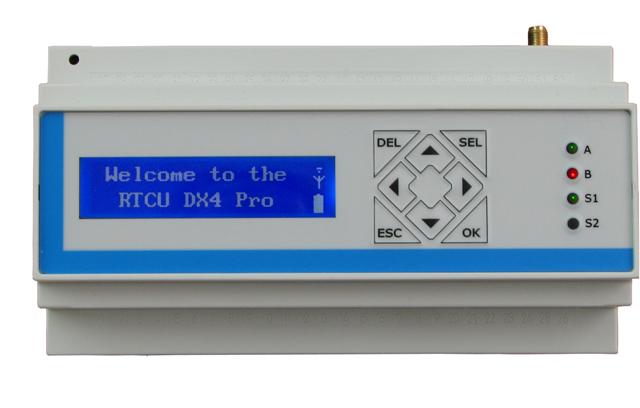
The next big thing - filesystem on the internal memory and on SD-card.

RTCU cont.

So I have started playing with the RTCU DX4 pro that I've mentioned earlier. The approach is quite new for me, as I'm used to drawing your software, instead of writing the code, as I'm usually programing in LabView. Also most of the automation engeineers is used to graphic programming, as most of the PLC software is 'drawn'. But... here we go.

Firstly - I have got an LCD in the unit. Screw blinking LEDs, lets do the classics:


 PROGRAM test_1;  
 // These are the local variables of the program block  
 VAR  
 END_VAR;  
 // The next code will only be executed once after the program starts  
 // displayClear();  
   displayPower(power:= ON);  
   displayXY(x:=1, y:=1);  
   displayString(message:="Hello world");  
   Sleep(delay:=3000);  
   displayClear();  
   an_out := 100;  

So - yay - the display works. Next thing is to display something more 'active', lets do a clock:


Okay. And next - add some status readings. In this cas the power supply voltage and temperature inside the module (and a mysterious number):


 BEGIN  
   // Code from this point until END will be executed repeatedly  
   clock();  
   displayXY(x:=1, y:=1);  
   displayString(message:="T "+sintToStr(v:=clock.hour)+":"+sintToStr(v:=clock.minute)+":"+sintToStr(v:=clock.second)+" ");  
   displayXY(x:=1, y:=2);  
   displayString(message:="V="+intToStr(v:=boardSupplyVoltage()/10)+" temp="+intToStr(v:=boardTemperature()/100));   
 END;  
 END_PROGRAM;  

The mysterious number is read from the front-panel keypad that I'm currently fighting with. Wihout using any kind of interrupts it's quite hard to have an keyboard input AND do some stuff in the same time. I mean - you can always multithread (this controller is capale of that) but wihout that it is not that simple, and there must be a trick to do that. Currently I do not know the trick so I'm stuck with that.

The clock() is a functionblock of clockGet type, that allows me to get to the real time clock in the device.

Tomorrow I'll try to interface with the SD-card inside and iButton memory on the dedicated 1-Wire line. If someone would need the codes for the upper examples I can publish them here. Source code posted for the upper examples and will be posted for all examples later.

czwartek, 16 sierpnia 2012

New toy

I've obtained an Remote Telemetry and Control Unit from Logic IO and I'll be playing with it in next few days/weeks. The RTCU DX4 pro is an GPRS-enabled control model for remote telemetry. The module is equipped with many cool functionalities (like iButton support) and several analog and digital IOs. It is programmed in some pseudo-pascal language and configured via USB. So stay tuned and wait for first effects.

sobota, 14 kwietnia 2012

Building an 386 system


Sooo, finally I've put together 386 system that I've got from a guy that was cleaning his garage and getting rid of this machine. First of all I dismantled the whole computer and cleaned the housing. After that the battery on the motherboard was removed, because it was leaky. Electrolyte fortunately haven't done much damage so I've only had to clean the pcb.


After that I've soldered a new battery and put everything together. Although the motherboard has normal ISA slots this housing uses a riser card. This card is plugged into one of the 16 bit ISA slots and offers two 8 bit and three 16 bit ISA slots.


At the current moment the spec of this machine are: 386DX-40 and 16MB RAM. The graphics card is a Trident TVG9000 with 512k of RAM. In the computer you can also see SCSI controller. It's an AHA1540B with 50pin HDD interface (SCSI-1 and SCSI-2 compatible) and with 34pin FDD controller. Also in one of the 8bit slots I've put an I/O controller with serial, paralel and game ports - what a convienient usage of these ports. I still have to connect the floppies and HDD in order to install anything on this machine. After that I have an Scientific Solutions board ready for that PC. It's an 96 digital I/O card. I hope to run some parallel feed digital-to-analog converters on that.


As you can see I've added an second page for my blog called Inventory (see top). I plan to put there all the stuff that I have at home. At the current moment only some of the computers are fully described, the rest is waiting for the description or to be fixed/completed/put together.

czwartek, 9 lutego 2012

Some initial evaluation

So today I've received a package from Intersil containing their ISL26134 Evaluation Board. As I have not read the application note earlier I didn't knew what to expect. Surprise was big, just look at the board:
Photo by Intersil.
So we have the full application of the ADC, with all four channels, internal and external reference voltage and all the configuration pins jumper-controlled - nice. But there is more! after a Si8441BB galvanic isolation there is a uC, an AT90USB162 AVR. Let's say that this part I've been expecting (as a maximum) but the uC ISP pins are on a standard 6pin pin-header(!) and there is more - four switches, some LEDs, even an SPI port on a header... hey - is it an ADC or AVR evaluation board?

Tomorrow I plan to do something more than installing the software on my PC. First let's test the board, second let's test the AVR. I hope I can get to it's software (for backup) and then try to reprogram it to use the evaluation board for some future fun.