piątek, 17 sierpnia 2012

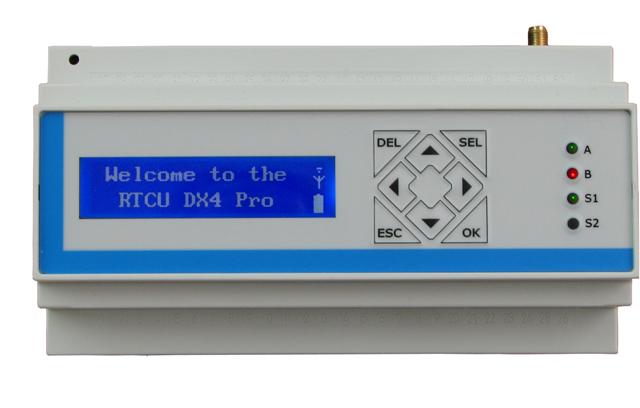
RTCU front-panel keypad

In this example I use the front keypad to control an integer variable. Using up and down keys (codes 120 and 121) the user can increment and decrement the variable. Pressing ESC key (code 125) resets the variable to 0.


 PROGRAM keypad;  
 // These are the local variables of the program block  
 VAR  
 k : INT; //Key pressed on the front-panel keypad  
 x : INT; //Some number  
 END_VAR;  
 // The next code will only be executed once after the program starts  
   x := 0;  
   displayClear();  
 BEGIN  
 // Code from this point until END will be executed repeatedly  
   k := displayGetKey(timeout:=1);  
   if k = 120 then   
    x := x+1;   
    elsif k = 121 then   
      x := x-1;   
      elsif k = 125 then   
       x := 0;   
   end_if;  
   displayXY(x:=1, y:=1);  
   displayNumber(number := x);  
 END;  
 END_PROGRAM;  

The variable is displayed on the front-panel LCD using displayNumber() function, that is much easier to use when displaying only numbers, compared to displayString(message:=intToStr()) function combination. On the other hand when using the displayNumber one can not easily format the output with some markings, so I suggest sticking to the casting method (eg. casting the integer to string and adding some text markings). The output is similar, the displayNumber() example code takes 2658 bytes and  displayString(message:=intToStr()) takes 2712 bytes. Additional 54 bytes are occupied by the casting I guess, but this shouldn't be a big problem, when one realizes that the total memory for the configuration is up to 640 KB.

The next big thing - filesystem on the internal memory and on SD-card.

RTCU cont.

So I have started playing with the RTCU DX4 pro that I've mentioned earlier. The approach is quite new for me, as I'm used to drawing your software, instead of writing the code, as I'm usually programing in LabView. Also most of the automation engeineers is used to graphic programming, as most of the PLC software is 'drawn'. But... here we go.

Firstly - I have got an LCD in the unit. Screw blinking LEDs, lets do the classics:


 PROGRAM test_1;  
 // These are the local variables of the program block  
 VAR  
 END_VAR;  
 // The next code will only be executed once after the program starts  
 // displayClear();  
   displayPower(power:= ON);  
   displayXY(x:=1, y:=1);  
   displayString(message:="Hello world");  
   Sleep(delay:=3000);  
   displayClear();  
   an_out := 100;  

So - yay - the display works. Next thing is to display something more 'active', lets do a clock:


Okay. And next - add some status readings. In this cas the power supply voltage and temperature inside the module (and a mysterious number):


 BEGIN  
   // Code from this point until END will be executed repeatedly  
   clock();  
   displayXY(x:=1, y:=1);  
   displayString(message:="T "+sintToStr(v:=clock.hour)+":"+sintToStr(v:=clock.minute)+":"+sintToStr(v:=clock.second)+" ");  
   displayXY(x:=1, y:=2);  
   displayString(message:="V="+intToStr(v:=boardSupplyVoltage()/10)+" temp="+intToStr(v:=boardTemperature()/100));   
 END;  
 END_PROGRAM;  

The mysterious number is read from the front-panel keypad that I'm currently fighting with. Wihout using any kind of interrupts it's quite hard to have an keyboard input AND do some stuff in the same time. I mean - you can always multithread (this controller is capale of that) but wihout that it is not that simple, and there must be a trick to do that. Currently I do not know the trick so I'm stuck with that.

The clock() is a functionblock of clockGet type, that allows me to get to the real time clock in the device.

Tomorrow I'll try to interface with the SD-card inside and iButton memory on the dedicated 1-Wire line. If someone would need the codes for the upper examples I can publish them here. Source code posted for the upper examples and will be posted for all examples later.

czwartek, 16 sierpnia 2012

New toy

I've obtained an Remote Telemetry and Control Unit from Logic IO and I'll be playing with it in next few days/weeks. The RTCU DX4 pro is an GPRS-enabled control model for remote telemetry. The module is equipped with many cool functionalities (like iButton support) and several analog and digital IOs. It is programmed in some pseudo-pascal language and configured via USB. So stay tuned and wait for first effects.